How to remove footnotes in Google Docs

How to remove footnotes in Google Docs

You may not believe it, but removing footnote in Google Docs is easier than creating them. How, then? You’ve come to the right place if you’re looking for an answer to this question! Yes! Using this article, we demonstrate how to achieve this in Google Docs. To remove the following footnote in your Google Docs …

Read more

How to rearrange pages in Google Docs

How to rearrange pages in Google Docs

Do you Want to rearrange pages in Google Docs? Don’t worry. Even though Google Docs does not provide an inbuilt option, it is possible to do it manually. Follow the below steps. 3. Now, you can right-click –> Select the Cut option or press Ctrl + X to remove the entire content from the page. …

Read more

Google Docs Commenter vs Editor

Google Docs Commenter vs Editor

Well, in this article we will discuss Google Doc commenter vs Editor. Basically, we will discuss the key differences between both of them. Google Docs Commenter vs Editor Let’s make a tabular comparison between Commenter and Editor in Google Docs. What is the role and key responsibilities of a Google Docs Commenter and Editor? Google …

Read more

How to make a bracket in Google Docs

How to make a bracket in Google Docs

Do you want to know how to make a bracket in Google Docs?. Then this is the article for you. Follow the simple steps below. 3. On the Insert special characters window, search for the bracket, and you will find a list of brackets as the search result. 4. Click on the specific bracket you …

Read more

How To View Two Pages Side By Side In Google Docs

How To View Two Pages Side By Side In Google Docs

Comparison between two Google Docs documents or two pages becomes easier if we view two pages or two documents side by side in Google Docs. In this article, we will discuss how to view two pages side by side in Google Docs (4 simple methods). If you’re looking to compare two Google Docs documents or …

Read more

How To Duplicate A Page In Google Docs

How To Duplicate A Page In Google Docs

Are you wondering how to duplicate a page in Google Docs? Well, making a duplicate of a Google Docs Document is quite easy. You can do this using a few clicks. Follow the below instructions. Open the Google Docs document. Click on File –> Choose the Make a copy option. 3. By default, it will …

Read more

How to undo superscript in Google Docs

How to undo superscript in Google Docs

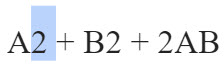
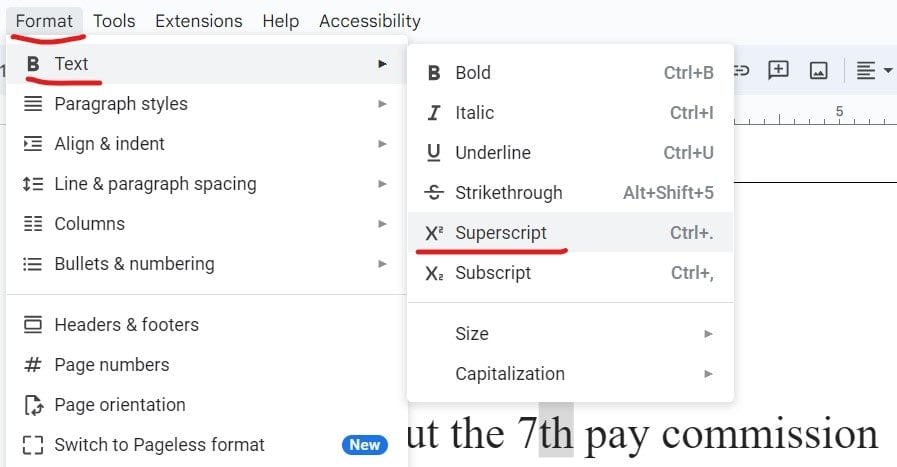
Follow the below 2 simple steps to achieve this. 2. Click on the Format menu, select Text, and click on the Superscript option. The Superscript symbol is now removed successfully. Check out the screenshot below. Video Tutorial You may also like following the related articles below

How to group images in Google Docs 

How to Group in Google Docs 

Google Docs allows you to combine your images into a single image. Moving and organizing images this way will become much easier than doing it one at a time. So, how do you group images in Google Docs?  Follow the below steps.  1. To log on to Google Docs, go to the Google Docs website.  …

Read more

Google Drive resize image

resize an image in Google Drive

No official approach exists to resize your images in Google Drive. Let’s dive deep to know some workarounds on how to resize an image in Google Drive. You can use some add-ons and Google Docs for this purpose. Approach-1: Using Photo Editor With Drive Add-on Photo Editor is a Chrome add-on that provides many effects …

Read more

How to make the th small in Google Docs

How to make the th small in Google Docs

Yes, it is possible to make th small in Google Docs. Approach-1: Using the Superscript option Follow the below steps. 2. Select th and then click on the Format menu, then select text and choose the superscript option as shown in the screenshot below. 3. Now, the th is converted to a small one successfully. …

Read more