
This article will discuss the quick steps to insert p hat symbol in Google Docs.
Follow the below steps
- Open your Google Docs document where you wish to insert the p hat symbol.
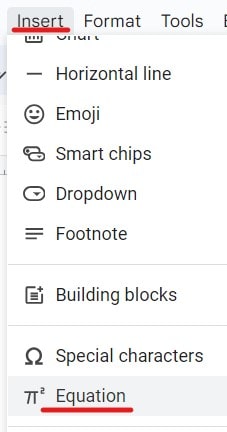
- Click on the Insert menu –> Select the Equation option.
3. Now, the equation box will be inserted, as shown in the screenshot below.

4. Type \hat inside the equation box and then press the spacebar.
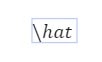
5. Now, the hat symbol has been inserted successfully, as shown in the screenshot below.

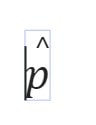
6. Now, type p or the other alphabet as per your requirement, and here, our p hat symbol has been inserted successfully, as shown in the screenshot below.
Video Tutorial
You may also like following the articles below
- How to insert trademark symbol in Google Docs (4 Easy Methods)
- How to add degree symbol in Google Docs
- How To Insert Paragraph Symbol In Google Docs
- How to make the th small in Google Docs

I am Rajkishore, and I have over 14 years of experience in the Software Industry. For a long time, I have been using Google Docs, Google Drive, and Google Sheets for my document usage, and I am sharing all the tips and tricks, the challenges I have come across, and their solutions to use Google Docs for your day-to-day use. I hope you will learn from these practical Google Docs tutorials. Read more.