
Follow the below 2 simple steps to achieve this.
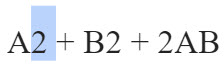
- Select the superscript character that you have added to your Google Docs document.

2. Click on the Format menu, select Text, and click on the Superscript option. The Superscript symbol is now removed successfully. Check out the screenshot below.

Video Tutorial
You may also like following the related articles below

I am Rajkishore, and I have over 14 years of experience in the Software Industry. For a long time, I have been using Google Docs, Google Drive, and Google Sheets for my document usage, and I am sharing all the tips and tricks, the challenges I have come across, and their solutions to use Google Docs for your day-to-day use. I hope you will learn from these practical Google Docs tutorials. Read more.